自建节点宝宝级教程
自建节点宝宝级教程
March 24, 2026
前置
- VPS: AWS 免费小鸡
- sing-box
- Ubuntu 24.04.4
添加入站规则
添加一个端口,接收TCP,如 10086 端口。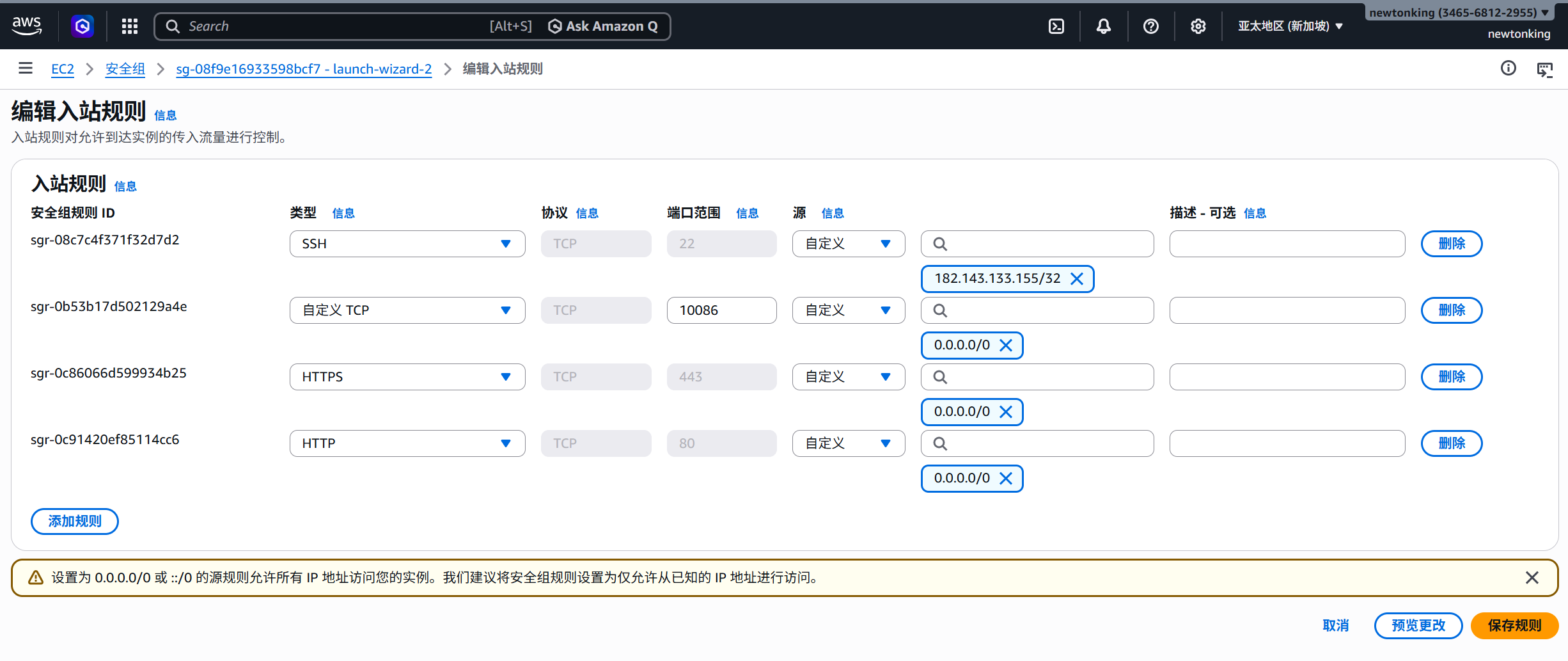
基础:朴素 sing-box + clash verge
所谓朴素 sing-box 就是 客户端 -> 服务器10086端口 -> sing-box 服务,入站类型采用shadowsocks,方法使用aes-128-gcm。
安装 sing-box
在服务器执行:
bash <(curl -fsSL https://sing-box.app/install.sh)这个是官方脚本,相对安全。
完成后用
sing-box version来验证
创建配置文件
在服务器执行:
sudo mkdir -p /etc/sing-box-p递归创建,如果目录不存在,创建;如果已经存在,不报错/etc专门放配置文件的地方,例如/etc/nginxnginx 配置文件目录/etc/sshssh 配置文件目录
- 后续我们使用
systemctl命令默认就会在etc里面找要用的文件
编辑配置:
sudo nano /etc/sing-box/config.json编写最简单配置(Shadowsocks) 其实前面下官方脚本的时候就有了这个文件,我们修改一下,把它变得简单一点。
{
  "log": {
    "level": "info"
  },
  "inbounds": [
    {
      "type": "shadowsocks",
      "listen": "::",
      "listen_port": 10086,
      "network": "tcp",
      "method": "aes-128-gcm",
      "password": "5V8zJDbDQsRveXVh+2JEJA==",
      "multiplex": {
        "enabled": true,
        "padding": true
      }
    }
  ],
  "outbounds": [
    {
      "type": "direct"
    }
  ]
}
启动服务
sudo systemctl start sing-box开机自启(可选):
sudo systemctl enable sing-box检查是否成功:
sudo systemctl status sing-box客户端配置
客户端,指的就是你平时用的的设备:你的电脑,手机···为了访问到服务器(这个梯子)的服务所需的软件。这里我们用:
- Windows: Clash Verge
- 安卓:Clash Meta
BBR
是一种 TCP 拥塞控制算法,它能:
- 根据带宽和延迟智能调速
- 不容易降速 所以更快,更稳定。
检查有没有使用 BBR
sysctl net.ipv4.tcp_congestion_control输出:
bbr√cubic×
若没有,开启 BBR
在配置文件/etc/sysctl.conf的最后添加这两行:
net.core.default_qdisc=fq
net.ipv4.tcp_congestion_control=bbr
让配置生效
sudo sysctl -p小升级:双协议方案
| 协议 | 用途 |
|---|---|
| Reality(无证书版) | 隐蔽 TCP |
| UDP | 加速 |
Reality 无证书版
协议:shadowsockets -> vless
修改 sing-box 配置文件
sudo nano /etc/sing-box/config.json 大改内容,因为协议所需要的字段不同
{
  "log": {
    "level": "info"
  },
  "inbounds": [
    {
      "type": "vless",
      "listen": "::",
      "listen_port": 8443, # 推荐 8443,避免端口冲突
      "users": [
        {
          "uuid": "你的uuid",
          "flow": "xtls-rprx-vision"
        }
      ],
     "tls":{
        "enabled": true,
        "server_name": "www.cloudflare.com",
        "reality": {
          "enabled": true,
          "handshake": {
            "server": "www.cloudflare.com",
            "server_port": 443
          },
          "private_key": "你的私钥",
          "short_id": [
            "你的short_id"
          ]
        }
      }
    }
  ],
  "outbounds": [
    {
      "type": "direct"
    }
  ]
}